

How to Optimize a YouTube Video in 2026: Complete SEO Guide
Learn how to optimize a YouTube video from keyword research to titles, thumbnails, descriptions, chapters, retention, publishing, analytics, and post-publish improvements.
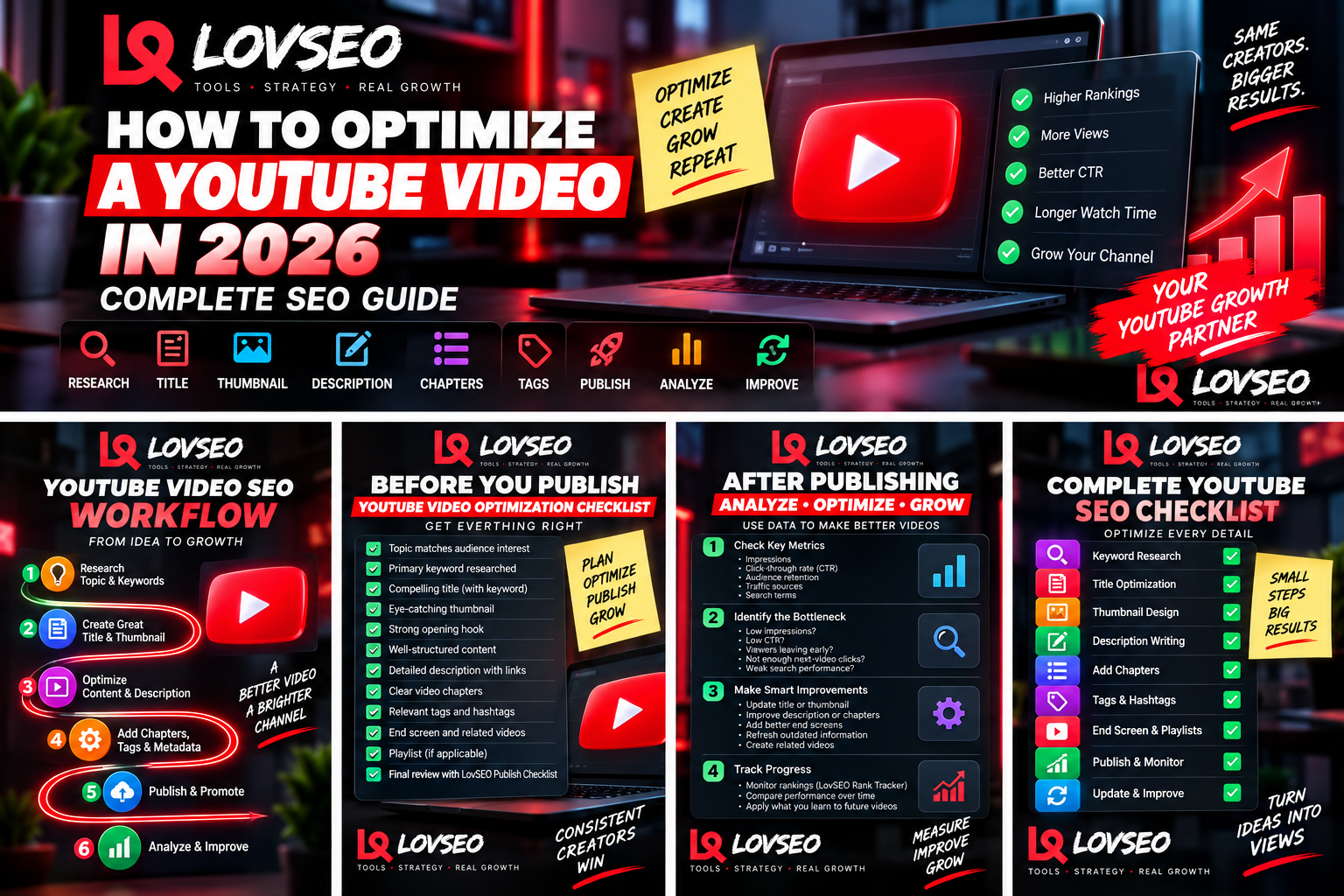
Optimizing a YouTube video is much bigger than adding a keyword to the title and filling out a few metadata fields. A properly optimized video connects the topic, search intent, title, thumbnail, opening hook, content structure, description, chapters, supporting metadata, internal video links, and post-publish analysis into one coherent strategy.
This guide walks through a complete YouTube video optimization workflow for 2026. The objective is not to manipulate YouTube's systems or promise a particular ranking. It is to make your video easier for the right audience to understand, choose, watch, and continue watching.
If you want to evaluate an existing upload, the LovSEO SEO Optimizer can help organize the optimization process.
What Is YouTube Video Optimization?
YouTube video optimization is the process of improving how clearly a video communicates its subject and how effectively it serves the audience interested in that subject.
Search optimization is part of that process, but it is not the entire process. A video can contain relevant keywords and still struggle if viewers ignore its thumbnail or leave shortly after clicking.
For that reason, useful optimization considers both discovery and viewer experience.
1. Start With the Topic Before the Keyword
Do not begin by asking, “Where can I put more keywords?” Begin by asking whether the video addresses something your intended audience actually wants.
Look for questions, problems, trends, recurring audience interests, and content gaps within your niche. A strong topic gives every later optimization step something worthwhile to support.
Use LovSEO Alpha Hunter to investigate content opportunities and LovSEO Competitor tools to study topics being covered across your niche.
Our YouTube content gap guide explains this process in more detail.
2. Research the Primary Keyword
Once the topic is clear, determine how viewers describe or search for it.
A primary keyword should accurately represent the video. Related keywords and semantic terms can then help describe the broader subject naturally.
For example, a video targeting how to optimize a YouTube video may naturally discuss:
- YouTube video optimization
- YouTube SEO
- keyword research
- video titles
- thumbnails
- descriptions
- chapters
- CTR
- audience retention
Use the LovSEO Keyword Research tool to investigate and organize keyword ideas.
You can also read our semantic keyword guide to understand why related concepts matter.
3. Understand Search Intent
Finding a keyword is not enough. You need to understand what viewers expect when they use it.
Search the phrase on YouTube and examine the results. Are viewers being shown tutorials, lists, reviews, comparisons, news, short answers, or long-form guides?
The goal is not to duplicate those videos. The results can help you understand what kind of problem the searcher appears to be trying to solve.
4. Create Several Title Options
Your title should make the subject clear while giving the intended viewer a reason to care.
Useful title angles can include a specific result, problem, question, comparison, timeframe, process, or benefit, provided the wording accurately represents the content.
Create multiple versions before selecting one. Compare them for clarity, specificity, keyword relevance, and how well they work with the thumbnail.
The LovSEO Title Generator can help create and compare title directions.
5. Optimize the Thumbnail and Title Together
The title and thumbnail should work as a pair rather than repeat exactly the same message.
If the title explains the subject, the thumbnail can emphasize the outcome, tension, transformation, visual proof, or central idea. Keep the design understandable at small sizes.
Use LovSEO Thumbnail tools to develop thumbnail concepts and review your packaging.
Our thumbnail A/B testing guide explains why testing assumptions can be more useful than simply trusting your favorite design.
6. Plan the Opening Hook
Optimization continues after the click.
The opening should quickly reassure viewers that the video will deliver what the title and thumbnail promised. Avoid spending the first minute explaining unrelated background information when viewers came for a specific answer.
A useful opening can identify the problem, establish what the viewer will learn, and create a clear reason to continue.
The LovSEO Hook Lab can help develop opening ideas.
7. Structure the Video for Retention
Good retention starts before editing. Organize the video so each section naturally leads to the next.
Remove unnecessary repetition, use examples where they improve understanding, and make progress visible to the viewer. For longer videos, a clear structure becomes especially important.
The LovSEO Video Script Generator can help organize a structured draft before recording.
8. Write a Useful Description
Your description should explain what the video covers in natural language.
Use the primary topic where it genuinely belongs and include related concepts without repeating phrases mechanically. Add relevant resources, links, or calls to action where useful.
The LovSEO Description Generator can help create structured descriptions.
9. Add Clear Video Chapters
Chapters can make longer videos easier to navigate and help viewers understand the structure at a glance.
Use descriptive chapter labels. “Keyword Research” tells viewers much more than “Part 2.”
The LovSEO Chapter Editor can help organize chapter timestamps and labels.
10. Add Relevant Tags and Hashtags
Tags and hashtags are supporting elements, not magic ranking buttons.
Use them accurately and keep them relevant to the actual content. Avoid filling metadata with unrelated popular terms merely because they receive searches.
LovSEO provides dedicated Tag tools and a Hashtag Generator for this stage.
11. Complete a Pre-Publish Optimization Check
Before publishing, inspect the entire package rather than only the title.
- Is the topic clear?
- Is the primary keyword appropriate?
- Does the title accurately describe the value?
- Does the thumbnail remain understandable when small?
- Does the opening deliver the promise quickly?
- Is the description useful?
- Are chapters accurate?
- Are tags and hashtags relevant?
- Is the end screen configured?
- Is there an appropriate next video for the viewer?
The LovSEO Publish Checklist can help standardize this process.
12. Connect the Video to the Rest of Your Channel
A well-optimized video should not necessarily end with a dead end.
When appropriate, guide the viewer toward another relevant video through end screens, playlists, descriptions, pinned comments, cards, or verbal transitions.
Use the LovSEO Related Video Manager and Bulk End Screen tool to organize these connections.
13. Publish Consistently, Not Mechanically
A content schedule can help maintain momentum, but publishing frequency should not force you into irrelevant or poorly prepared topics.
Plan related content around audience needs and create clusters that naturally support one another.
The LovSEO Content Calendar can help organize upcoming topics.
14. Analyze the Video After Publishing
Post-publish data can tell you where the optimization process may need improvement.
Useful questions include:
- Is the video receiving impressions?
- Which traffic sources are producing views?
- Are viewers clicking when they see the video?
- Where do retention drops occur?
- Which search terms are producing traffic?
- Are viewers continuing to another video?
- Is search visibility changing over time?
Do not interpret one metric in isolation. CTR, for example, can change as a video reaches different audiences and traffic sources.
15. Track Search Visibility
For videos targeting search demand, monitor whether their visibility changes over time.
The LovSEO Rank Tracker can help organize keyword-position monitoring rather than relying on occasional manual searches.
16. Diagnose the Bottleneck Before Making Changes
Random optimization creates random results. Diagnose the likely problem first.
If impressions are low
Review topic demand, competition, audience fit, relevance, and whether the video clearly communicates its subject.
If impressions exist but clicks are weak
Investigate the title, thumbnail, and positioning.
If viewers click but leave quickly
Review the opening, pacing, structure, and whether the content delivers what the packaging promised.
If viewers watch but do not continue
Improve the connection to related videos and content clusters.
If search performance is weak
Revisit search intent, keyword targeting, topic coverage, competition, and viewer response.
17. Refresh Older Videos With Evidence
An older video does not automatically need to be deleted. If it still addresses a useful topic, you may be able to improve its packaging or metadata.
Possible updates include a new title, thumbnail, description, chapters, end-screen routing, or supporting metadata.
Read our guide to refreshing old YouTube videos before removing content that may still have value.
18. Optimize Multiple Videos Efficiently
As a channel grows, manually reviewing every field across dozens or hundreds of videos becomes cumbersome.
The LovSEO Bulk SEO tools are designed to help organize optimization work across larger video libraries.
The key is still judgment. Bulk tools should make deliberate changes easier, not encourage changing hundreds of videos without understanding why.
Complete YouTube Video Optimization Checklist
Before recording
- Choose an audience-relevant topic.
- Research the primary keyword.
- Study related semantic terms.
- Understand search intent.
- Review competing content and gaps.
- Plan the title and thumbnail direction.
During content creation
- Create a strong opening.
- Deliver the promised value.
- Structure the video logically.
- Remove unnecessary repetition.
- Create a natural path to another relevant video.
Before publishing
- Finalize the title.
- Check the thumbnail at small size.
- Write the description.
- Add useful chapters.
- Add relevant tags and hashtags.
- Configure end screens and related links.
- Complete the publishing checklist.
After publishing
- Review impressions.
- Review CTR in context.
- Analyze audience retention.
- Check traffic sources.
- Review search terms.
- Track relevant rankings.
- Identify the likely bottleneck.
- Make evidence-based improvements.
Frequently Asked Questions
How do I optimize a YouTube video for SEO?
Start with an audience-relevant topic and keyword, understand search intent, create an accurate title and thumbnail, structure the content well, write a useful description, add clear chapters and relevant supporting metadata, connect the video to related content, and analyze performance after publishing.
Where should I put keywords in a YouTube video?
Use important topic language naturally where it accurately describes the content, including the title and description when appropriate. Chapters, tags, and other metadata can provide additional context. Avoid repetitive keyword stuffing.
Should the exact keyword be in the YouTube title?
It can be useful when the phrase fits naturally and accurately describes the video, but readability and viewer clarity matter. Do not force awkward wording solely to include an exact phrase.
How many tags should I use?
There is no universal number that guarantees better performance. Use relevant tags that genuinely describe the video rather than trying to fill every available space.
Can I optimize a YouTube video after publishing?
Yes. Depending on the situation, creators can update elements such as titles, thumbnails, descriptions, chapters, tags, and end-screen connections. Use analytics to determine what actually needs attention.
Does changing a thumbnail help an old video?
It may help when the video continues receiving impressions but its packaging is not attracting the intended audience. Evaluate the video's data before deciding whether the thumbnail is the likely bottleneck.
Final Takeaway
YouTube optimization works best as a complete system rather than a collection of isolated SEO tricks.
Research the right topic. Understand the viewer. Package the video clearly. Deliver what you promised. Connect it to relevant content. Then use performance data to improve intelligently.
LovSEO brings these workflows together through Keyword Research, Title Generator, Thumbnail tools, Hook Lab, Description Generator, SEO Optimizer, Rank Tracker, Bulk SEO, and other creator tools.
Article Tags
Want more YouTube SEO insights?
Subscribe to our newsletter for weekly tips and strategies.
Related Articles
Join Our Newsletter
Get weekly YouTube SEO tips and strategies delivered to your inbox.